


homebridge-macosx-info is homebridge plugin for Apple HomeKit, get and return somes systems informations from macOS system.
- Exemple of .json data response file
- Prerequisites
- Installation
- Configuration
- Todo
- Known bugs
- Credits
- Disclaimer
- License
Sunday 18 September 2019 : History Graphs are not shown since Eve.app updated to v3.8.1. But with new update App version 3.8.3, the history graph is back!



Such as :
- Temperature (C°)
- Fan speed (rpm)
- Uptime
- show how long system has been running
- Load average (%)
- the load average of the system over the last 1, 5, and 15 minute
- Free Mem (Mo)
- Disk space avalable (%)
- Users (nb)
- CPU Power consumption (Watt)
See changelog
You can see below four screenshots for illustrate homebridge-macos-info homebridge/HomeKit plugin.
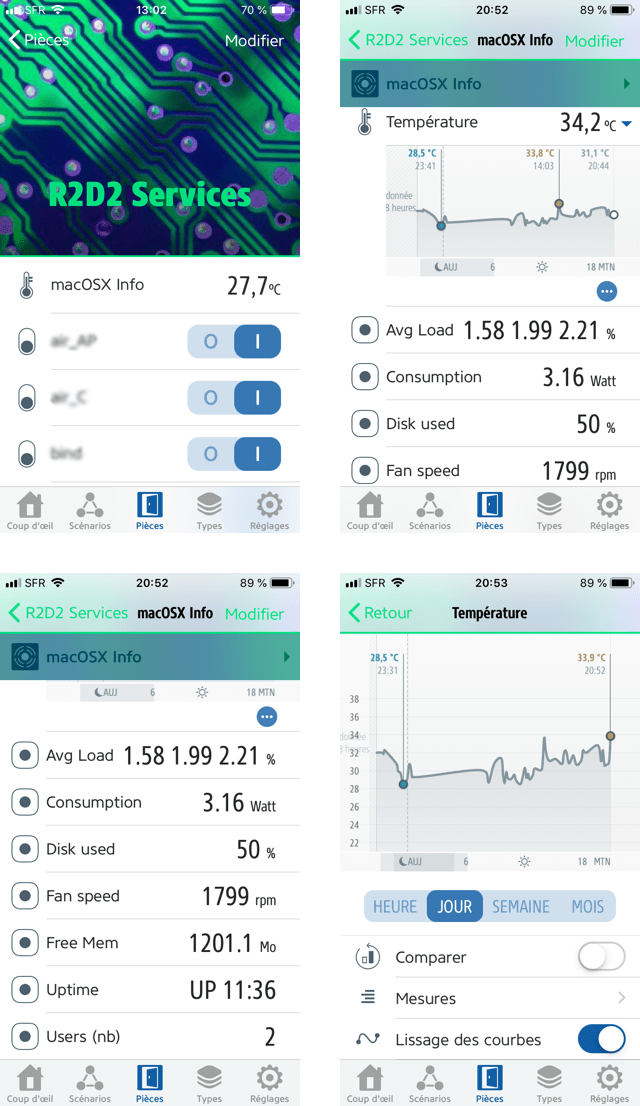
Screenshots are taken from iOS Eve.app
Exemple of .json data response file
1 | { |
Prerequisites
- Install Homebrew (Homebrew installs the stuff you need that Apple didn’t)
- Install node.js on macOS
- Install Homebridge on macOS
- Install Homebridge Config UI X on macOS (optional)
- Install Eve.app on iOS (for all availables plugin function), or it’s possible to used “Home” app on macOS (only avalable for macOS Majave) or iOS (all plugin function aren’t availables on this app !)
- Enable NOPASSWD for user in
/etc/sudoersfile
Installation
Used npm tool to install homebridge-macosx-info, and execute the command line below
1 | npm i homebridge-macosx-info |
Configuration
STEP 1 : homebridge config.json file
Add this lines in config.json
1 | "accessories": [ |
| Parameter | Note | Optionnal | value |
|---|---|---|---|
accessory |
Name of accessory | No | MacOSXSysInfo |
name |
a human-readable name for your plugin | No | macOSX Info |
file |
.json respons file | yes | default : /tmp/_homebridge-macosx-info.json |
updateInterval |
is time in ms of data update | yes | default : null |
consumption |
true for log CPU Consumption |
yes | default : null |
user |
true for log Users number |
yes | default : null |
1. The index.js call <PATH of Node Module>/homebridge-macosx-info/sh/homebridge-macosx-info.sh shell script. You can find this script in the repository in /src/sh directory 2. It’s possible that you can change the path of homebridge-macosx-info.sh in readUptime function on index.js script
1 | async function readUptime() { |
STEP 2 : Adapte homebridge-macosx-info.sh file in src/sh directory
- You can change path of temporary .json files :
JSON_DATA_FILEvariable - You can change path and option of
check_osx_smcbinary -> varCHECK_OSX_SMC
1 | DIR=$(dirname $0) |
STEP 3 : Add NOPASSWD entry in your /etc/sudoers
1 | # root and users in group wheel can run anything on any machine as any user |
Note: You must change the user
<USER>by the user who runhomebridgein your system
STEP 4 : restart homebridge
Combine the two commands in a terminal to restart homebridge background process
-
launchctl unload ~/Library/LaunchAgents/com.homebridge.server.plist -
launchctl load ~/Library/LaunchAgents/com.homebridge.server.plist
This commands are only avalable for macOS
Todo
- Generate all the measures in a .json file [#3]
- Worked on performance
- Use only sh built-in (no sed & no awk) [#4]
Known bugs
- Uptime error in “homebridge-macosx-info” after more than one day ! [#1]
- Temparature and fan mesures don’t work on all Apple hardware. Used now
check_osx_smcbinary. You can see the hardware compatibility here. [#2]
Credits
- The original HomeKit API work was done by KhaosT in his HAP-NodeJS project
- simont77 - fakegato-history
- Jedda Wignall - OSX-Monitoring-Tools/check_osx_smc
Disclaimer
I’m furnishing this software “as is”. I do not provide any warranty of the item whatsoever, whether express, implied, or statutory, including, but not limited to, any warranty of merchantability or fitness for a particular purpose or any warranty that the contents of the item will be error-free. The development of this module is not supported by Apple Inc. or eve. These vendors and me are not responsible for direct, indirect, incidental or consequential damages resulting from any defect, error or failure to perform.
License
This project is licensed under the MIT License - see the LICENSE file for details